
Beyond Chatbots: How to Build Asynchronous AI Agents on Google Cloud
When we think of AI agents, we almost instinctively picture a chatbot: a user types a question, and the agent replies immediately.
This request/response model is great for direct human interaction, but it doesn’t fit every use case.
Real-world enterprise systems are often distinct, disparate, and disconnected.
They communicate through events—messages sent between systems to trigger actions asynchronously.
If you want your AI agent to automate complex orchestrations (like processing insurance claims, analyzing logs as they arrive, or summarizing documents uploaded to a bucket), you need to break out of the synchronous “chat” loop.
In this post, we’ll explore how to plug an AI agent into an event-driven architecture.
We will move beyond the standard API call and look at how to trigger a Python-based agent asynchronously using Google Cloud Pub/Sub and Eventarc.
This approach allows you to integrate AI into established interfaces without modifying them, effectively turning your agent into a silent, scalable background worker.
Core concepts
To make an agent “event-driven,” we need a way to listen for signals and trigger the agent without a direct user waiting on the other end of a phone line.
The recommended architecture for this solution combines three powerful Google Cloud tools:
- Pub/Sub: A scalable messaging service that acts as the delivery channel. It buffers messages (events) until our agent is ready to process them.
- Eventarc: An eventing platform that standardizes the routing. It listens to Pub/Sub and routes the events to our application in a standard “CloudEvent” format.
- Cloud Run (hosting the ADK Agent): Our AI application, built with the Gen AI Agent Development Kit (ADK), runs as a container. It doesn’t need to run 24/7; Eventarc spins it up only when an event arrives.
This setup ensures our infrastructure is scalable and secure. We aren’t just opening a public HTTP endpoint; we are creating a managed binding between a message queue and our AI logic.
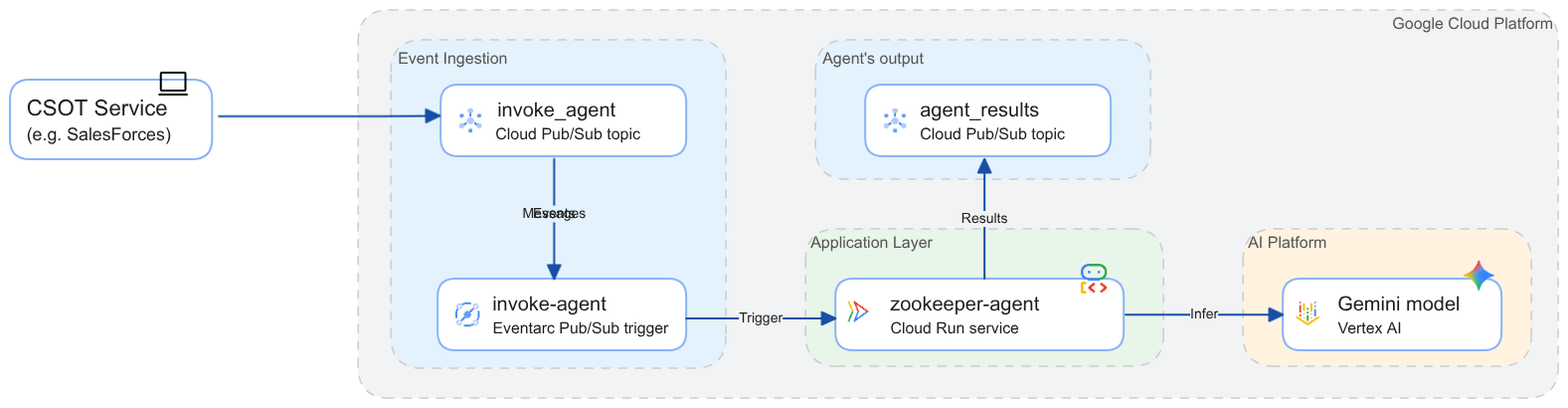
Let’s look at how we actually implement this in Python. The full code of the demo you can find in devrel-demos on GitHub. The following sections focus on the “glue” that connects the event stream to the AI Agent.
The Entry Point (main.py)
First, you need a web server (like FastAPI) to accept the trigger from Eventarc. Eventarc uses HTTP requests to a web server endpoint to trigger an event processing. The request payload wraps the Pub/Sub message in a standard format. The web server needs to listen for these requests and extract the payload.
@app.post('/zookeeper')
async def eventarc_handler(request: Request) -> JSONResponse:
    try:
        body = await request.body()
        event = from_http(request.headers, body)
# process the Eventarc event …
    except Exception as e:
        return JSONResponse(content={'status': 'error', 'message': 'Failed to parse payload to Eventarc event'}, status_code=400)
The demo uses FastAPI because this is a high-performant web framework for building APIs with Python used by ADK for deploying agentic architectures to Cloud Run and Agent Engine.
The Processor Logic (processor.py)
This is where the actual work happens. The payload you received in main.py contains a Pub/Sub message, but the actual data (your user’s prompt or event details) is Base64 encoded inside that message.
You need to perform three tasks here:
Task (1) Decode the Pub/Sub message data from the Eventarc event payload
The Pub/Sub message data is retrieved from the CloudEvent object where it is stored in Base64 format and then decoded:
pubsub_message = {}
try:
    if 'message' in event.data and 'data' in event.data['message']:
        encoded_data = event.data['message']['data']
        decoded_bytes = base64.b64decode(encoded_data)
        pubsub_message = json.loads(decoded_bytes.decode('utf-8'))
    else:
        raise ValueError('CloudEvent does not follow Pub/Sub message schema')
except Exception as e:
    return JSONResponse(content={'status': 'error', 'message': 'Failed to parse Pub/Sub message from Eventarc event'}, status_code=400)
Task (2) Prepare parameters for executing a request on an ADK Runner
In order to invoke an agent you will need an ADK Runner.
You can learn more about ADK Runner in ADK Runtime documentation.
The call to the run_async() method requires user ID and session ID parameters and a user request.
The demo reads a user ID parameter from the Pub/Sub message and generates a new session for each call.
I will explain more regarding this decision when reviewing caveats.
You will note that many methods in ADK are asynchronous.
The demo awaits for each of the methods to complete in order to complete handling the event before returning from executing the event handler.
user_id = pubsub_message['user_id']
session_id = str(uuid.uuid4())
await runner.session_service.create_session(
  app_name=runner.app_name, user_id=user_id, session_id=session_id
)
data = pubsub_message['prompt']
message = types.Content(
  role='user',
  parts=[types.Part.from_text(text=data)]
)
Task (3) Invoking a root agent of the ADK Runner
The following code snippet demonstrates asynchronous invocation of the ADK Runner and retrieves the response.
This code example is not different from ADK tutorials.
I post it here for the complete picture and not because the call to the run_async() method of the Runner is done differently when making event-based invocation.
response = ''
try:
  async for event in runner.run_async(
      user_id=user_id,
      session_id=session_id,
      new_message=message,
  ):
    if event.is_final_response():
      if event.content and event.content.parts:
        for part in event.content.parts:
          if part.text:
            response += part.text
          elif event.actions and event.actions.escalate:
            return JSONResponse(
                     content={'status': 'error',
                              'message': f'Agent escalated: {event.error_message or 'No specific message.'}'},
                     status_code=500)
            break
except Exception as e:
  return JSONResponse(content={'status': 'error', 'message': 'Error invoking designated runner'}, status_code=500)
If your implementation needs to call the run_async() method of the Runner from a synchronous environment, you will need to use the asyncio package and call it as following:
import asyncio

asyncio.run(runner.run_async(...))
Note that this code snippet collects the response from the agent as text. The response then is encoded and pushed to a designated Pub/Sub topic together with the session ID. Other ways to asynchronously return the response would be writing results to a database or storing the results in a Storage bucket.
Caveats
Incorporating event-driven invocation of AI agents introduces complexity. I want to highlight four critical considerations you must address before going to production:
-
Identity Management: In a chat app, the user is the person logged in. In an event-driven app, the “caller” is Eventarc. You must ensure the original
user_idis passed inside the Pub/Sub message data so the Agent knows who it is working for. -
Session Strategies: You have two choices here:
- Stateless (My Recommendation): You create a new session for every request. This avoids race conditions where two events for the same user might corrupt the context.
- Stateful: You pass the session_id inside the Pub/Sub message data together with
user_idand reuse session IDs. This is risky; you must handle locking so multiple requests don’t modify the same session memory simultaneously. Additionally, “zombie” sessions (contexts kept alive for weeks) can degrade model performance.
-
Handling Responses: As I mentioned in the previous section, the code posts the Agent’s response to a designated Pub/Sub topic because it cannot simply return an answer. The HTTP request from Eventarc is just a trigger. You must design the Agent to proactively post its results to a new channel (like a “Response” Pub/Sub topic or a database table for events).
-
Request Pairing: In the example above, after you post a response, you cannot know which request it relates to. In production, you should pass a correlation_id through the entire chain so the result can be paired back to the original trigger.
Conclusion
You saw how to “unplug” the AI agent from the transactional mode of work.
By using Google Cloud Eventarc and Pub/Sub, you can transform the agent into a scalable background worker capable of handling tasks triggered by disparate enterprise systems.
This architecture allows you to integrate your AI agent to legacy event-based solutions without changing code of the legacy systems.
You also can automate processes such as monitoring logs, respond to file uploads, or react to database changes using AI intelligence.
Next steps
This post does not cover a couple of topics:
- Identity-based authorization: The current demo allows anyone who can push a message to you Pub/Sub topic to trigger the agent.
I strongly recommend enforcing authorization based on
user_idor to pass OIDC tokens in the Pub/Sub message data to control access management to the agent. - Explore Runner multi-tenancy: Cloud Run service in the demo hosts a single ADK Runner to serve event-based invocations. You can implement multiple Runners in your Cloud Run service to handle both transaction-based and event-based invocation at multiple endpoints.
Additional materials
- Review the full source of the demo at GitHub
- Try out step-by-step deploying and running the demo
- Study the reference architecture orchestrating access to disparate enterprise systems
- Learn how to trigger Cloud Run using Eventarc triggers
- ADK documentation