
Master ADK Callbacks: DOs and DON'Ts
If you’re building agents with the Agent Developer Kit (ADK), you’ve probably realized that the standard request-response loop isn’t enough. Real-world agents need to enforce safety policies, log detailed metrics, and maintain state across turns.
To solve these challenges, ADK provides Callbacks. These are your hooks into the agent’s brain, allowing you to observe, intercept, and even rewrite execution flows on the fly. But with great power comes great responsibility—and a few ways to shoot yourself in the foot.
Let’s walk through how to use Callbacks effectively, when to switch to Plugins, and the anti-patterns you need to avoid.
What Are ADK Callbacks?
At their core, Callbacks are user-defined functions that the ADK framework executes at specific lifecycle points. They allow you to “hook” into the process without rewriting core framework code.
You can hook into events like:
before_agent/after_agent: Run logic before the agent starts or after it finishes its main work.before_model/after_model: Inspect or modify prompts sent to the LLM and the responses coming back.before_tool/after_tool: Validate tool inputs or sanitize tool outputs.
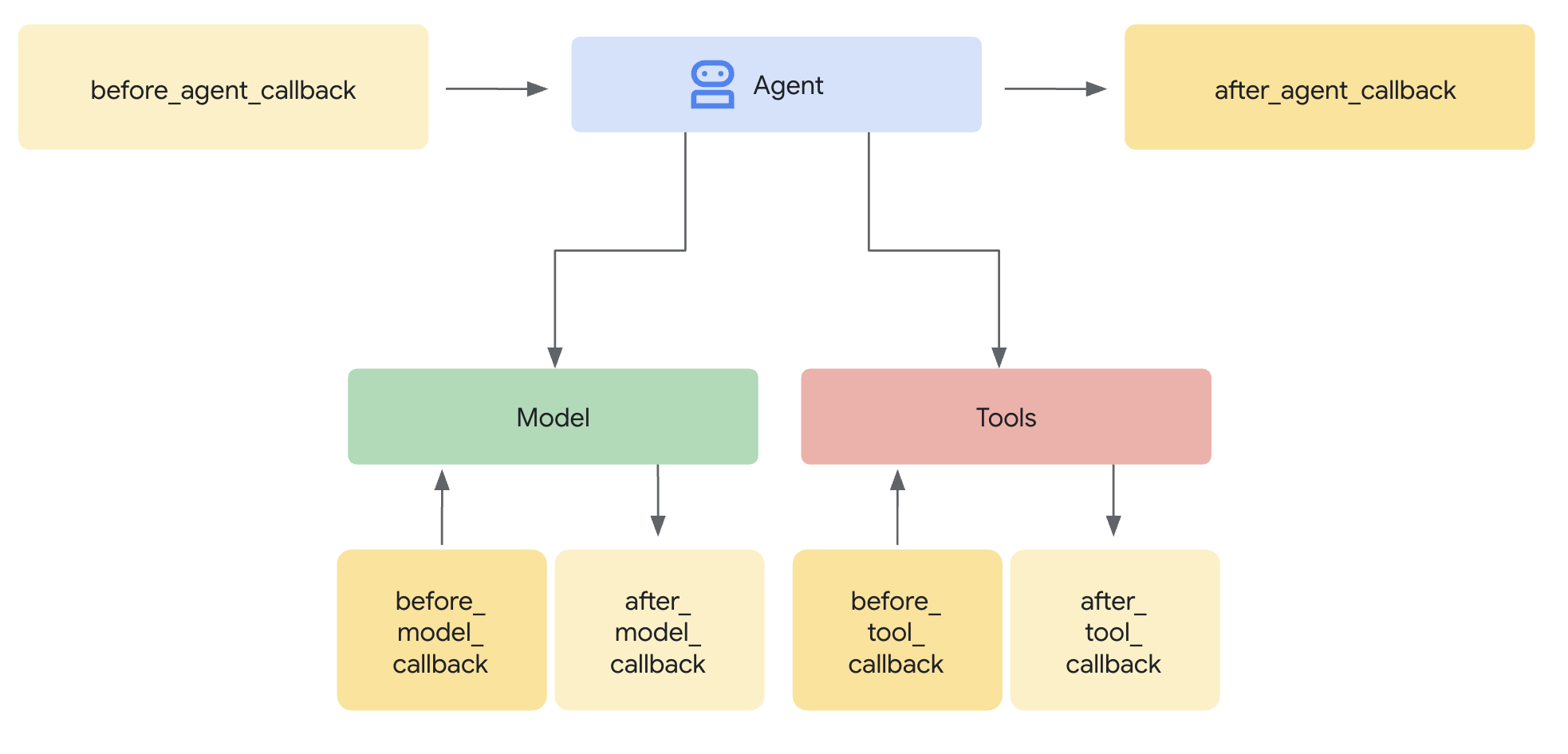
Figure 1: The ADK execution flow showing where callbacks intercept the Agent, Model, and Tools.
Crucially, callbacks give you control flow.
- Return
None: The agent proceeds as normal (potentially with modified data). - Return an Object: You short-circuit the execution. For example, returning a
LlmResponsein abefore_modelcallback prevents the actual LLM call, letting you serve a cached or canned response immediately.
from google.adk.agents.callback_context import CallbackContext
from google.adk.agents.llm_agent import Agent
from google.adk.models import LlmResponse, LlmRequest
from google.genai.types import Part

async def modify_prompt(
    callback_context: CallbackContext, llm_request: LlmRequest
) -> LlmResponse | None:

    # Alter the prompt to append instructions
   for content in reversed(llm_request.contents):
        if content.role == "user" and content.parts:
            content.parts[0].text += "\n\n(Note: Please answer in a concise, pirate persona.)"

    # Returning None tells ADK to proceed with the modified request object
    return None


# Register the callback when initializing your agent
my_agent = Agent(
    name="pirate_bot",
    model="gemini-2.5-flash",
    callbacks={
        "before_model": modify_prompt
    }
)
Recommended Patterns
According to the ADK Callback Patterns, you should stick to these proven strategies:
- Guardrails & Policy Enforcement: Use
before_modelto scan for forbidden topics. If a user asks for something restricted, return a pre-canned rejection response immediately. - Dynamic State Management: Use
callback_context.stateto read or write session-specific data. For example, check a user’s subscription tier inbefore_agentto customize the greeting. - Logging & Observability: Use
after_toolto log the exact arguments and outputs of your tools for debugging. - Caching: Check a cache in
before_modelorbefore_tool. If you have a hit, return it and skip the expensive API call.
Callbacks vs. Plugins: Which One Do I Use?
It’s easy to confuse Callbacks with Plugins because they allow you to hook into the same lifecycle events. However, the difference lies in scope, capabilities, and portability.
1. Scope of Invocation
- Callbacks are Local: They are attached to a specific component (like an
Agentinstance). If you have a multi-agent system, a callback on Agent A won’t trigger for Agent B, even if they share the same model or tools. - Plugins are Global: Plugins are registered on the
Runner. They apply universally to every agent, tool, and LLM call within that runner’s execution. If you need a global logger or a universal security policy, use a Plugin.
2. Exclusive Error Hooks
Plugins have a superpower that standard Callbacks lack: Error Handling Hooks. Standard Callbacks only expose before_ and after_ hooks. Plugins exclusively expose on_model_error and on_tool_error. This allows you to implement global graceful recovery strategies—like retrying a failed API call or returning a fallback response—without crashing the agent.
from typing import Any
from typing import Optional
from google.adk.plugins import ReflectAndRetryToolPlugin
from google.adk.tools import BaseTool, ToolContext

class CustomRetryPlugin(ReflectAndRetryToolPlugin):
  """
  Customized retry plugin based on ReflectAndRetryToolPlugin
  """
  async def extract_error_from_result(self, *,
      tool: BaseTool,
      tool_args: dict[str, Any],
      tool_context: ToolContext,
      result: Any,
  ) -> Optional[dict[str, Any]]:    # Detect error based on response content

    if result.get('status') == 'error':
        return result
    return None  # No error detected
3. Registration Flexibility
While Plugins run globally, you have two ways to register them:
-
Via the Runner: You can pass a list of plugins directly when initializing your
Runner.from google.adk.runners import InMemoryRunner runner = InMemoryRunner( app_name='demo_app_with_custom_retry_plugin', agent=root_agent, # Add custom retry plugin to runner instance. plugins=[CustomRetryPlugin(max_retries=3)], ) -
Via the App Class: For better structure, you can define an
Appobject to encapsulate your agents and plugins together. This is the recommended approach for production apps as it centralizes configuration.from google.adk.apps.app import App app = App( name="demo_app_with_custom_retry_plugin", root_agent=root_agent, plugins=[CustomRetryPlugin(max_retries=3)], )
4. The Web UI Limitation
Here is the “gotcha”: Plugins are not available in the ADK Web UI. The ADK Web Interface is a great development tool, but it doesn’t support the global Plugin architecture. If your workflow relies heavily on Plugins, you must run your agent via the command line or the API Server runtimes.
However, you can easily compensate for this using the adk CLI:
adk runcommand: Use this to interact with your agent in command-line mode. It fully supports the Runner and App configurations, ensuring all your Plugins are active during the session.adk evalcommand: For structured testing, use ADK Eval. This command allows you to run your agent against an evaluation dataset from the terminal, making it perfect for automated verification and CI/CD pipelines where Plugins are essential.
The “DON’Ts”: Anti-Patterns to Avoid
It’s tempting to treat Callbacks as a “dumping ground” for arbitrary logic. Don’t do it. Here are two common traps and how to fix them.
Anti-Pattern 1: The “Secret” LLM Call
- The Trap: You want to refine the user’s query before the agent sees it. So, you write a
before_agentcallback that calls an LLM to rewrite the prompt. - Why it’s bad: You are burying complex, expensive business logic inside a hook that is supposed to be fast and observational. It makes debugging a nightmare and increases latency unpredictably.
- The Fix: Use a Child Agent or better Prompt Engineering. Instead of hiding the logic, explicitly delegate the task to a helper agent or an
AgentTool. Alternatively, optimize your system instructions to handle the refinement natively.
Anti-Pattern 2: RAG in a Callback
- The Trap: You want to inject context into the prompt, so you write a
before_modelcallback that queries (2) your backend service or database and appends the results tollm_request.prompt(1). - Why it’s bad: This reinvents the wheel and creates a “magic” dependency where the agent’s intelligence is hidden in the plumbing code rather than its tools.
- The Fix: Use a Tool. ADK supports tools specifically designed for this. Use the
VertexAiRagRetrievaltool. This makes the retrieval step explicit, observable, and manageable by the agent itself.
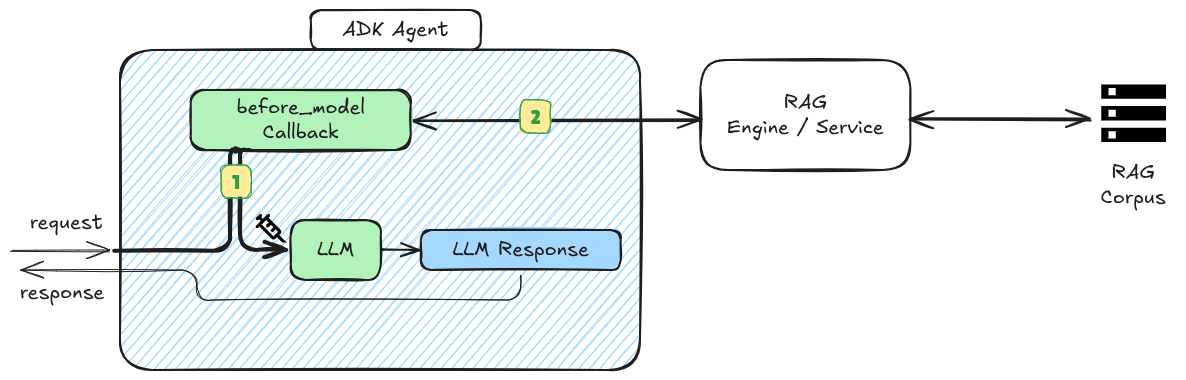
Figure 2: The RAG Callback anti-pattern. Logic is hidden, making the RAG a black box.
Anti-Pattern 3: The “Heavy Lifting” Callback
-
The Trap: You need to perform a long-running operation—like complex data processing, generating a PDF report, or writing to a slow legacy database. You place this logic inside an
after_agentcallback. -
Why it’s bad: ADK callbacks operate within the agent’s critical path. Even if your code is asynchronous, the framework waits for the callback chain to resolve before returning control or moving to the next step. Stuffing heavy operations here halts the user experience and can lead to timeouts.
-
The Fix:
-
For side effects (Logging/Analytics): Ensure the operation is nearly instant (e.g., pushing a message to a Pub/Sub queue) and let a separate consumer handle the heavy lifting.
-
For Workflow Logic: If the long-running process is part of the actual work (e.g., “The agent needs to wait for a report to generate”), do not use a callback. Instead, implement a Non-LLM Agent. Inherit from the
BaseAgentclass and encapsulate your logic in the_run_async_impl()method. This treats the operation as a first-class step in your workflow rather than a hidden side effect.from typing import AsyncGenerator from google.adk.agents import BaseAgent, InvocationContext from google.adk.events import Event, Content, Part, EventActions class ReportGeneratorAgent(BaseAgent): """ A deterministic agent that handles long-running tasks without needing an LLM. """ def __init__(self, name: str): super().__init__(name=name) @override async def _run_async_impl(self, ctx: InvocationContext) \ -> AsyncGenerator[Event, None]: logger.info(f"[{self.name}] Starting report.") # generate and write report asynchronously yield Event( author=self.name, content=Content(parts=[Part(text=thought_message)]), actions=EventActions(state_delta={"status": "in_progress"}) ) logger.info(f"[{self.name}] Report generated.") yield Event( author=self.name, content=Content(parts=[Part(text=final_message)]), # is_final_response() is often automatically set by the framework for the last event )
-
Anti-Pattern 4: Prompt Stuffing via Iteration
- The Trap: You have a
before_model callbackthat appends"Remember to be safe!"to every turn of the conversation history llm_request.contents. - Why it’s bad: You are exponentially increasing your token count. If the conversation is 10 turns long, you have injected that sentence 10 times. This degrades model performance and wastes money.
- The Fix: Use System Instructions. Modify the system instruction (invariant) once, or append your modifier only to the last message in the history.
Next Steps: Put it into Practice
By keeping your callbacks lightweight and your logic explicit, you’ll build agents that are easier to debug, scale, and maintain.
Ready to build more robust agents? Here is how to get started:
- Audit your lifecycle: Check your existing agents. Are you doing data retrieval in a callback? Convert it to a
FunctionTooltoday. - Go Global: If you have the same logging logic in three agents, move it to a
Pluginregistered at theApporRunnerlevel. - Evaluate: Run
adk evalon your agent to see how your new guardrail callbacks perform against edge-case prompts.
Explore more: Dive into the ADK Callbacks Documentation for a full list of available hooks.