
6 Nuances of Binary Authorization That Are Hard to Find in the Docs
I’ve built a showcase demo for Google’s Cloud Next 2026 and had a chance to explore in-depth the Binary Authorization service of Google Cloud. Surprisingly, I discovered that many things about this service aren’t exactly as straightforward as I perceived them to be. And it seemed to me as a good opportunity for “X things about a Y product…” post.
If you’re new to the service, Binary Authorization helps you enforce security on container-based applications. To simplify it further, the service manages attestations of the container images and helps define which attestations are required to deploy a container image to GKE or Cloud Run. Here are 6 things that I learned while setting up Binary Authorization to work for my demo.
Thing #1: Not every compute platform using containers is supported
You can deploy container images to almost any computation platform in Google Cloud. Let’s name a few (besides GKE and Cloud Run):
- Google Compute Engine (GCE): single VMs or group of VMs (using a template)
- App Engine: the oldest managed platform for applications
- Dataflow: ETL platform based on Apache Beam
- Agent platform on Vertex (Agent Engine)
Currently, support of Binary Authorization policy is extended to GKE (both Autopilot and Standard), Cloud Run and also to Service Mesh and GKE clusters that run on local hardware (Google Distributed Cloud). Documentation states that it also supports Cloud Service Mesh.
Thing #2: How many projects do you need to use?
Terminology first. I am speaking about Google Cloud projects. And formally speaking you can easily use only one. This is what I ended up using for my demo. Documentation speaks about three. And after reading it carefully, I counted four. Let me enumerate them and explain them rationally as I see it.
- Deployer: a project to manage Binary Authorization policies of your product describing required attestations for the container images of your product.
- Attestor: a centralized store for information about trusted parties ‒ called attestors, in the authorization process that verify attestations.
- Attestation: a storage of attestations that attestors make when they verify attested container images.
- Keykeeper: a centralized key manager for the cryptographic keys that Binary Authorization uses to securely verify the identity of attestors.
Using separate projects for these roles allows effectively enforcing Identity and Access Management (IAM) over the Binary Authorization artifacts. The Keykeeper is optional when SDLC manages PKIX keys locally.
Thing #3: Access Management
Before moving to other topics, I want to cover one more thing regarding IAM. The attestation process uses two identities: Builder ‒ an identity that accesses resources during the building process and invokes Binary Authorization API to verify (a.k.a. attest) the container image and the Binary Authorization Robot ‒ an identity of the Binary Authorization that is invoked when a container image is being deployed to validate the policy vs attestations of the image. These identities are IAM service accounts and need to be granted IAM roles to perform the necessary operations. I summarized the required roles per identity below.
Builder roles to run Binary Authorization attestors to sign attestations:
roles/binaryauthorization.attestorsViewerroles/containeranalysis.notes.attacher
If you verify attestation as a part of the build process
roles/cloudkms.signerVerifierroles/binaryauthorization.attestorsVerifier
Binary Authorization Robot roles to run Binary Authorization attestors to sign attestations:
roles/binaryauthorization.attestorsVerifier
Thing #4: How to enforce the attestation policy
While you can configure your deployment commands with instructions to validate Binary Authorization policy (e.g. --binary-authorization=default for Cloud Run) it can be easily overpassed.
You should enforce it through a policy instead.
For Cloud Run, use the run.allowedBinaryAuthorizationPolicies org policy.
For GKE, use the --binauthz-* flags when creating/updating GKE clusters.
Thing #5: Understand terminology
It took me a while to understand the difference between attestation and artifact analysis note, attestor and attestations and other terms. This is how I see it:
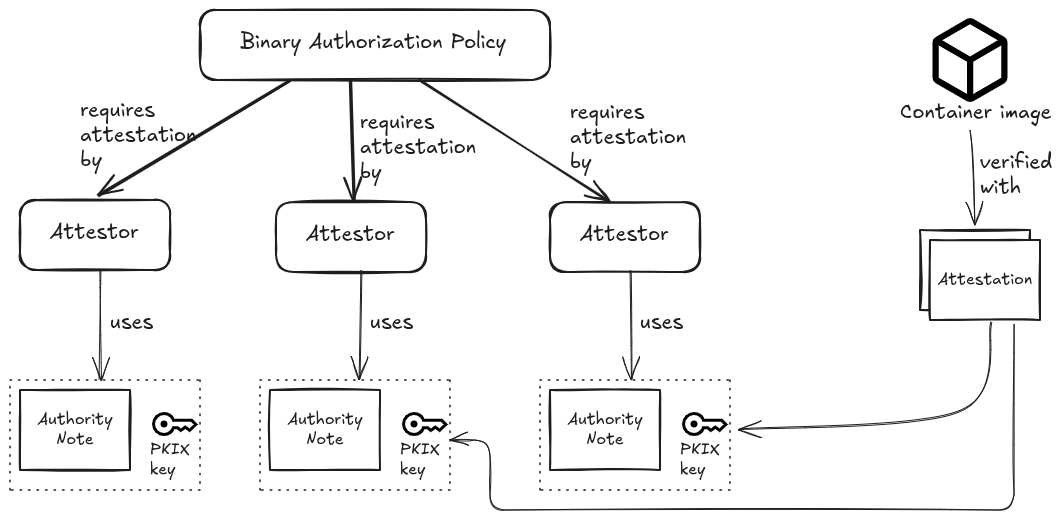
When the set of the verified attestors mismatch the attestors in the enforced Binary Authorization policy, the deployment fails. Configuring the policyon the container images deployed to GKE or Cloud Run effectively enforces attestations, hence attestors, on all the images deployed in the project.
Thing #6: Implementing attestation
Probably the most eye opening discovery for me was that Binary Authorization attestor DOES NOT implement attestation. All that it does is create an attestation as it is described in the Authority note and sign it with the private part of the PKIX key. This is all. My codelab for Cloud Next 2026 ‒ Build a secure agent: protect access and data attests the container image as built with the Cloud Build pipeline. It does it by including the attesting a.k.a. signing the attestation into the Cloud Build pipeline. In other words, to implement an attestation you need to create an automic hermetically secured two-step pipeline that first confirms the claims you want to attest the container image for and then creates an attestation using Binary Authorization attestor. See the Gating Deployments with Binary Auth codelab for an example of how to implement attestation that the container image does not have critical vulnerabilities.
Wrapping up
Binary Authorization is a highly effective service for securing your containerized workloads on Google Cloud, but like any robust security tool, it has its nuances. By understanding the distinct roles of your Google Cloud projects, setting up the exact IAM permissions needed, and recognizing what the attestor actually does (and doesn’t!) do, we can build much more resilient and secure deployment pipelines.
If you want to dive deeper into securing your environments, be sure to check out my Cloud Next 2026 codelab, Build a secure agent: protect access and data, or try your hand at the Gating Deployments with Binary Auth codelab. This post does not replace reading documentation. Happy deploying!